
Share on...

How to Create Everyday Workout Clips as Professional Fitness Videos

A quick phone recording of a home workout gets the exercise across, but it rarely has the polish needed to actually build an audience or sell a training program. You’ll quickly see how much that changes once Dreamina’s video tools get involved, turning a casual gym photo into something that looks genuinely studio-produced.
Dreamina, powered by its advanced Seedance 2.5 video generation model, is well suited to this kind of dynamic, movement-driven fitness content. Here’s how to turn an ordinary workout photo into footage worth publishing. Click here to generate workout clips with Dreamina now:

Why polished fitness content actually performs better

Fitness audiences respond to content that feels credible and motivating: clean lighting, confident form, dynamic energy. A shaky, dimly lit phone clip undercuts that trust instantly, regardless of how good the actual workout advice is. Professional-feeling motion signals expertise before a single word of instruction is spoken.

Choosing a starting photo with strong exercise form

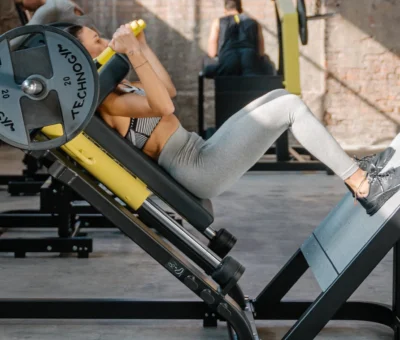
The quality of the final video depends heavily on the starting image. A few qualities worth prioritizing:
  • Clear, correct form already visible in the still photo
  • Bright, even lighting that won’t look muddy once in motion
  • An uncluttered gym or workout space background
  • A pose that naturally implies the exercise’s full range of motion

Building a sequence that shows a complete movement

A single static pose only tells part of an exercise’s story. Describing the full movement arc, the downward phase, the push, the return- gives the generated video a sense of genuine athletic repetition rather than a single frozen position stretched out.

Your 3-step fitness reveal with Dreamina

Step 1: Upload reference image and write corresponding prompt

Visit Dreamina, sign in, and head to the AI Video section. Click “Add reference image” to upload your workout photo, then write a prompt describing the full exercise movement you want animated.
A strong 30-second sample prompt might read: Reference the athlete’s squat stance and gym setting from the uploaded image. 0-10 seconds: controlled descent into a deep squat with strong, steady form. 11-20 seconds: powerful upward drive back to standing, muscles visibly engaged. 21-30 seconds: repeat the movement smoothly once more, ending in a confident standing pose.
Breaking the exercise into distinct phases keeps the resulting motion looking genuinely athletic rather than vague or floaty.

Step 2: Generate your video

After adding your image and prompt, choose the Seedance 2.5 model for generation. Next, choose your video length, then a suitable aspect ratio; 16:9 works well for a YouTube training library, while 9:16 suits Instagram Reels and TikTok fitness content. Finally, click Dreamina’s icon and wait a few seconds for processing.


Step 3: Enhance & export the video

Polish your clip before saving it using Dreamina’s AI editing tools. Use advanced tools like Upscale for crisp, high-definition footage that shows muscle definition and form clearly, or Generate soundtrack to add an energetic track that matches the workout’s intensity. Finally, export and share it across your training platforms.

What Seedance 2.5 brings to athletic motion

Seedance 2.5’s handling of complex editing tasks proves especially useful for fitness content, since a convincing workout clip depends on precise, physically accurate movement rather than generic animation.
Its reduced “AI look” and more realistic texture rendering also matter here, keeping muscle definition, sweat, and fabric movement looking genuinely photographic instead of synthetic.
And because clip length now extends to a full 30 seconds, a complete rep sequence can be shown with real pacing instead of being compressed into something that rushes past the actual form.

Building a full workout sequence from multiple photos

Once single-exercise clips work well, stringing together several, a warm-up stretch, the main lift, a cool-down pose, into one connected video creates a genuinely complete workout demonstration rather than an isolated single movement.

Matching camera energy to the exercise’s intensity

A slow, controlled strength movement calls for a steady, grounded camera feel, while an explosive cardio movement benefits from slightly more dynamic motion. Describing this camera energy directly in your prompt reinforces the exercise’s actual physical intensity rather than applying the same flat treatment to every movement type.

Keeping form visibly correct throughout

Since fitness content often doubles as instructional material, double-checking that the generated motion still reflects genuinely correct exercise form, rather than just looking dynamic, matters for both credibility and viewer safety when the content is meant to teach technique

Where professional-feeling fitness videos get real traction

This kind of polished movement content serves several practical goals:
  • Personal trainer marketing and client acquisition content
  • Fitness app and program promotional material
  • Social media growth for fitness creators and influencers
  • Gym and studio membership marketing campaigns

Repurposing one clip across a full content calendar

A single well-generated exercise clip rarely needs to be a one-time post. Trimming it into a short teaser, pairing it with different caption angles, or combining it with other exercise clips into a longer circuit video stretches the value of one strong piece of footage across an entire week’s content plan.

Final thoughts

A workout captured on a phone can genuinely look studio-produced, and it’s worth trying it free to see how much difference that polish makes for building a credible fitness presence.
With Dreamina and its advanced Seedance 2.5 video generation model, an ordinary training photo becomes dynamic, professional-feeling footage.
Start with a photo with strong visible form, break the movement into real phases, and let Dreamina help your fitness content look as strong as the workout itself.


Leave a comment/Ask a question

Your email address will not be published. Required fields are marked *

Visit SA Decor & Design on social media


Interested in advertising with us? Find out how →